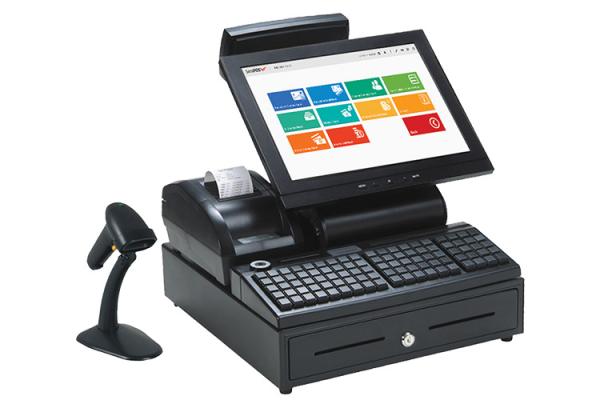
Running a business (biashara) in Kenya has changed significantly over the last few years. Today, you cannot afford to be physically tied to your shop counter just to prevent stock shrinkage or track cash flow. At the same time, regulatory changes by the Kenya Revenue Authority (KRA) mean that basic cash registers no longer make the cut.
Whether you operate a retail supermarket in Nairobi, a wholesale depot in Mombasa, or a pharmacy in Kisumu, selecting the right Point of Sale (POS) software determines your operational efficiency. This 2026 buyer's guide breaks down exactly what features are non-negotiable for the local Kenyan market.
1. Mandatory KRA eTIMS Compliance
Since the full rollout of KRA's electronic Tax Invoice Management System (eTIMS), compliance is no longer an afterthought—it is a legal requirement. Running a standalone, outdated desktop POS means your cashiers have to ring up a sale twice: once in your store ledger and once manually inside the KRA eTIMS client app.
The best POS systems in Kenya feature native, system-to-system eTIMS integration using either an Online Sales Control Unit (OSCU) or a Virtual Sales Control Unit (VSCU). Every time a sale is finalized at your counter, the software automatically transmits transaction data to KRA in real time, generates a valid tax invoice with a unique QR code, and registers the data seamlessly without delaying your customer checkout queue.
2. Direct M-Pesa STK Push Integration
Cash is no longer king in Kenyan retail; mobile money dominates daily transactions. A modern POS must support native M-Pesa integration via STK Push.
Avoid systems that rely on manual confirmation, where your cashier has to read a customer's phone message or type in a transaction code manually. Manual entries slow down operations and open the door to fraud via fake M-Pesa SMS alerts. With native STK Push, typing the total amount on the screen automatically triggers a pin prompt directly on the customer's phone. Once paid, the POS instantly reconciles the sale and prints the receipt.
3. Cloud-Based Access with a Reliable Offline Mode
Kenya's internet infrastructure has improved rapidly, but occasional downtime still occurs. Relying on a purely cloud-dependent system means a temporary drop in connectivity will halt your entire store's operation.
Look for a hybrid POS system that runs smoothly on the cloud but features an active offline backup mode. This allows your team to keep processing cash and mobile sales, scanning barcodes, and printing receipts even when the internet goes down. The moment connection stabilizes, all local data securely syncs back to your central server automatically.
4. Bulletproof Inventory and Expiry Date Tracking
Stock shrinkage whether from theft, damage, or unrecorded sales—eats heavily into retail profit margins. Your chosen software must offer real-time inventory tracking across multiple branches or stockrooms.
For high-turnover setups like pharmacies or convenience stores, prioritize software featuring batch tracking and automated low-stock alerts. It should notify you weeks in advance when specific items are nearing their expiry dates, allowing you to run clearance promotions instead of incurring total dead-stock losses.
5. Total Hardware Compatibility
A great software solution is useless if it refuses to communicate with your physical retail hardware. Before committing to a subscription, ensure the POS system provides seamless plug-and-play support for standard accessories available in Kenya:
- USB and Bluetooth barcode scanners
- 58mm and 80mm thermal receipt printers
- Electronic cash drawers
- Integrated customer-facing display screens
Conclusion: Make the Smart Choice
Do not purchase a POS system based on upfront software price alone. Factor in the total cost of ownership including licensing, hardware setup, eTIMS configuration, and ongoing local technical support. Prioritizing compliance, mobile payment automation, and offline